
Create courses, plan dates, book rooms – in minutes instead of evenings.
A single course, a series, a subscription or a free choice of dates: Kursimple maps every course model you offer. With a price and a place limit per date, a waiting list, the course day planner and an occupancy calendar for every room and venue. Part of every plan, from €19 a month.

From the draft course to the booked room
Everything that today lives in spreadsheets, wall calendars and email threads has a fixed place in Kursimple – and knows about the rest.
Create the course once – and publish it with a click
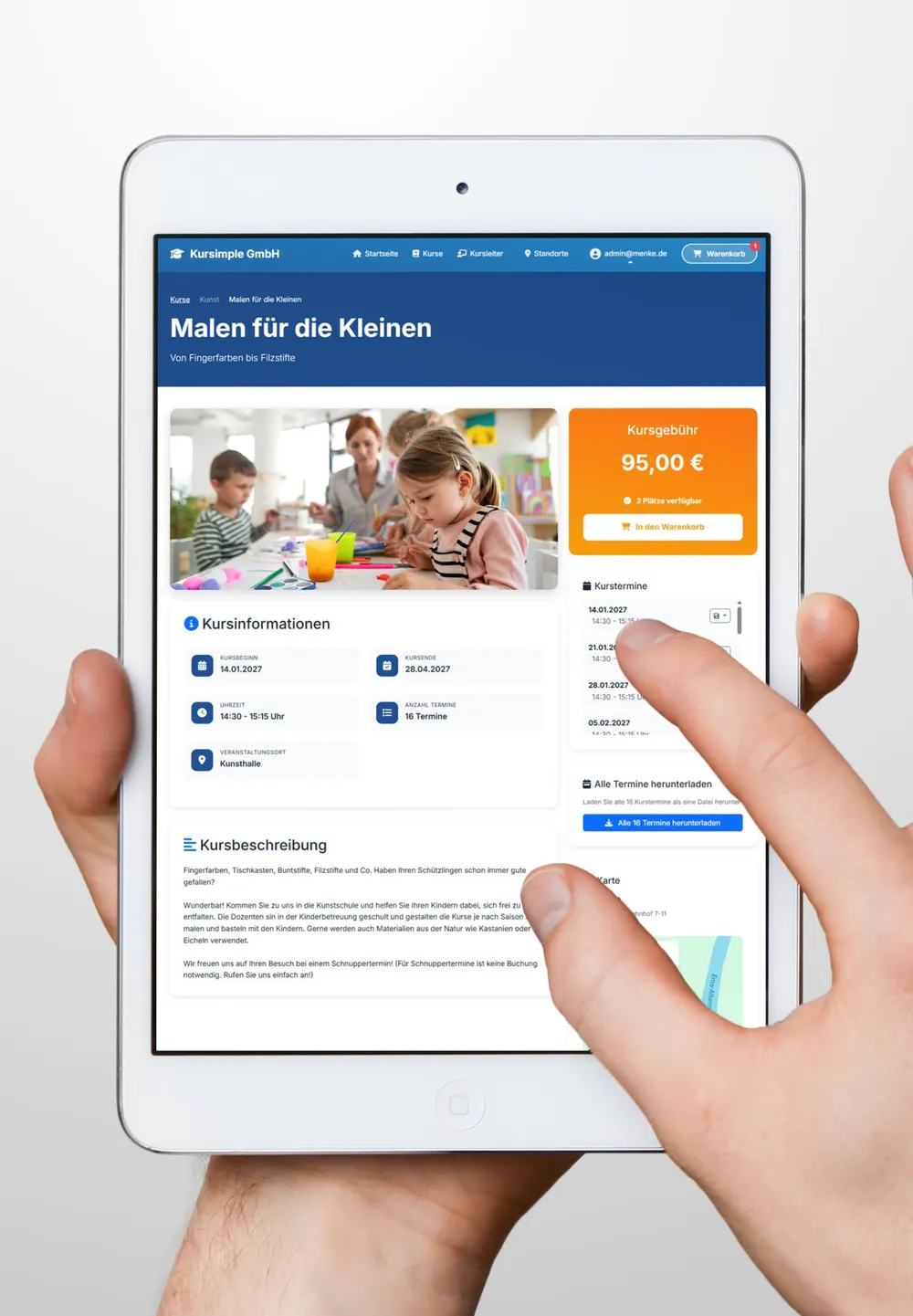
Title, subtitle, a course number from your own number range, a description in the rich text editor, an image gallery with cropping. One click on “publish” and the course is on your course website with pictures, dates, a map and a booking button.
- Categories, course types, series, keywords: painting or music, beginner or advanced – your programme stays as structured as your brochure.
- A target age from–to for children's courses, so parents can see at once whether the course suits their child.
- Extra fields per course – list of materials, prior knowledge, teaching units – which we set up for you, and put on the certificate if you want.
- Copy a course, duplicate a date, automatic archiving: the next term is quickly set up, and past dates tidy themselves away.
Plan dates as a series – with a room, a price and places per date
A course date consists of any number of course days. The course day planner works them out immediately – one-off, daily, weekly on several weekdays or monthly – and leaves out holidays as days off. You adjust individual days directly, and for each day you choose on site, online or hybrid. Price, VAT rate and material costs are set per course or per date – the date price wins.
- A place limit, an occupancy counter and a waiting list per date – overbookings go onto the waiting list, and you move people up with a click.
- Move the waiting listNew – take people waiting to another date in a few clicks; duplicate registrations are spotted.
- Occupancy check – Kursimple checks the occupancy against the orders, drilling down to the single item.
- Material costs per participant, VAT at 19, 7 or 0 %: every date may differ, such as the workshop day with paints included.
- Duplicate a date: all course days and instructors come along, and the waiting list can be transferred to the extra date.
Subscriptions, bundles and free dates instead of rigid term logic
Ongoing groups are booked as a subscription with a recurring date: one rule instead of one date per period, billed automatically. Dates that belong together you sell as a bundle. One-to-one lessons or consultations run through course templates – the customer picks free slots in the monthly calendar.
- Subscription with recurring datesNew – several groups per course, the start chosen at checkout, billing per period or course day, pro rata if you wish, by invoice or direct debit.
- Course bundlesNew – dates bookable only together, the price is the sum. Participants are entered once.
- Free choice of dates: slots are bookable, on request or taken – now in your back-office order screen too, when somebody phonesNew
- Products without a date: materials, handouts or rental instruments go into the same cart as the course.
- Plans: subscription courses from Plus; the subscription model with recurring dates, bundles and free choice of dates in the Pro plan – with no commission on the booking.
Keep track of every room and every instructor
Set up venues with rooms (number, floor, building), pictures and documents – the Google Maps map is created automatically by geocoding. Every room and every venue has its own calendar, so nothing gets double booked.
- Instructor profiles with a photo, a gallery and a biography; several instructors per date.
- Instructor login: their own start page with their courses, participant lists, attendance and a serial mail to the group – they maintain the profile themselves (from the Plus plan).
- Connect Zoom webinars: participants are registered automatically when booking, everyone else with a click (Pro plan).
- Calendar export: ICS per date or for all dates, plus Google and Outlook links for participants.
What else courses & dates can do
Small features that make the difference day to day – all at no extra cost in your plan.
What course providers ask about courses & dates
Can a date have a different price from the course?
Yes. Price, VAT rate and material costs exist per course and per date. If a price is set on the date, it overrides the course price – for the workshop day or the taster evening, for example. Material costs are charged per participant and appear separately on the invoice.
What is the difference between a course, a course template and a product?
A course has fixed dates that get booked. A course template has no fixed dates: the customer chooses free slots in the monthly calendar – ideal for one-to-one lessons or consultations. A product is an item without a date, such as materials or a handout.
All three end up in the same cart and on the same invoice.
How does the waiting list work?
The waiting list applies per date. If a date is fully booked, interested people put their names down online. When a place frees up, you move a participant into the course with a click. Waiting list and place limits are already part of the Start plan at €19 a month.
Your next term – set up in an afternoon.
Show us your course programme and in 30 minutes we will show you how it looks in Kursimple. Or set up your own test system in 30 seconds – free and without obligation.
Questions? +49 5931 990 99 10 · Mon–Thu 8:30–17:30, Fri 8:00–14:00 (CET)